Managing a long-term health condition at home does not mean doing everything alone. You can stay involved in your care, choose routines that fit your day, and ask for support when you need it.
This checklist explains how remote patient monitoring for older adults can fit into that plan. Remote patient monitoring means taking health readings at home with devices that share information with your care team. It is one tool for support—not a promise of independence or a replacement for all office visits.
Use these five steps to prepare for a conversation with your clinician. This article offers general education, not a personal treatment plan.
- Keep your health plan and contact numbers in one place.
- Use the devices and checking schedule your clinician recommends.
- Know who reviews your readings and when to call for help.
- Use coaching, telehealth, and family support in ways you choose.
- Ask about eligibility, insurance terms, and possible costs before enrolling.
1. Make a Home Health Plan That Fits Your Day
A useful home health plan starts with your everyday life. Think about when you wake up, eat meals, take medicines, and have a few quiet minutes for a reading.
Your checklist action: Work with your clinician to put your key health information on one easy-to-find page. Keep a copy near your devices or in a folder you bring to appointments.
- Your health conditions and current medicines, including supplements.
- The readings your clinician wants you to take and when to take them.
- Any preparation needed before a reading.
- Changes in readings or symptoms that should prompt a call.
- Your care team’s phone numbers and after-hours instructions.
Ask whether a regular activity, such as getting ready for breakfast, is a good reminder for your checks. The right timing depends on your care plan; do not change medicines on your own based on home readings.
Make room for comfort and safety
Choose a well-lit spot where you can reach your supplies comfortably. Keep cords and other items out of walkways, and avoid placing equipment where you must stretch or bend awkwardly to use it.
The National Council on Aging’s home safety guide offers more ideas for making your living space easier to navigate. Home setup is a practical part of support for independent living, alongside your health routine.
If you want, invite a family member or trusted friend to help organize your plan. You decide what help is useful and which details you wish to share.
2. Use the Right Devices and Learn Your Routine
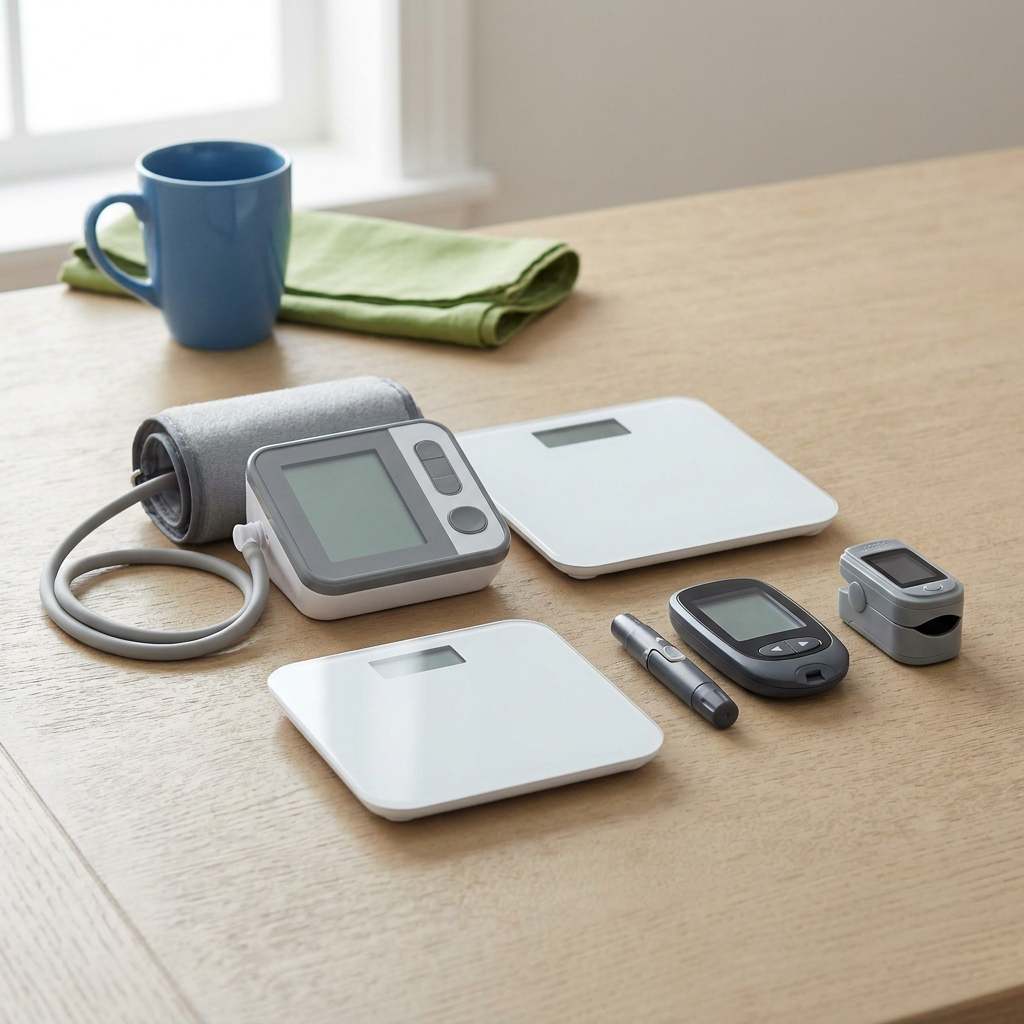
Your checklist action: Ask which home health monitoring devices fit your needs. Not everyone needs all four types shown here; these are general examples, not specific VitalGuard products.
VitalGuard offers easy-to-use home devices and unlimited device support. Explore the types of monitoring devices available, then ask your team which ones belong in your plan.
A blood pressure cuff
A cuff measures the pressure of blood against your artery walls. For blood pressure monitoring at home, rest quietly for at least five minutes before checking.
Sit with your back supported, feet flat, and legs uncrossed. Place the cuff on your bare upper arm, support that arm at heart level, and avoid talking during the reading. Ask your care team to check cuff fit and demonstrate your device.
For more help preparing your routine, read VitalGuard’s guide to managing high blood pressure at home.
A scale for weight
A scale tracks your body weight. If your clinician recommends weight monitoring at home, ask when to weigh yourself and how to keep conditions consistent from one check to the next.
Use the scale on a firm, level surface and follow its instructions. Tell your team if stepping onto it or standing still feels difficult.
A blood glucose meter
A glucose meter measures the amount of sugar in a small blood sample, usually from a finger. Blood glucose monitoring at home should follow the schedule and technique your diabetes care team recommends.
Ask for a demonstration of testing, safe handling of supplies, and disposal of used lancets. Your team should explain what your results mean for your own care plan.
A fingertip oxygen monitor
A fingertip pulse oximeter estimates how much oxygen your blood is carrying. For oxygen level monitoring at home, follow the device instructions and ask your clinician about factors that can affect accuracy.
A device reading is only part of the picture. Tell your team about symptoms, too, even when a number seems usual for you.
Ask your support team to walk you through a check, then explain the steps back in your own words. If a screen, button, or reading is unclear, use VitalGuard’s unlimited device support rather than guessing.
3. Know Who Reviews Your Readings and When to Get Help
Sharing readings can give your care team information from your daily life. It also helps to know what happens after a device sends that information.
Your checklist action: Write down who reviews your readings, how to reach them, and what to do if a reading or symptom concerns you. Learn how VitalGuard monitoring works and confirm contact hours and response procedures with the team.
What monitoring includes
VitalGuard provides daily clinical monitoring and monthly doctor oversight. These services support review of your health information and conversations about your care.
What monitoring does not mean
Daily monitoring does not mean someone watches every reading as it arrives. It does not promise an immediate response or replace emergency care.
Ask your clinician for a personal action plan for unusual readings. It should explain when to repeat a check, when to call, and when to seek urgent help, without relying on a single target that applies to everyone.
Also mention changes such as dizziness or feeling unsteady. The CDC’s resources for older adults and caregivers include information about fall risks and topics to discuss with a healthcare professional.
Remote monitoring and telehealth are not emergency services. For a medical emergency, call 911 rather than waiting for a reading to be reviewed. Do not wait for a concerning number if you think you need emergency help.
4. Use Coaching, Telehealth, and Support on Your Terms

Your checklist action: Pick one question or daily habit to discuss at your next conversation. You might ask how to fit checks into your morning or what a pattern in your readings could mean.
VitalGuard’s personalized health coaching is a partnership. You and your care team can discuss practical goals, what feels manageable, and where you would like more explanation.
Support should make your routine easier to understand—not take your choices away.
Telehealth is healthcare provided by phone or video, depending on the service. VitalGuard offers unlimited telehealth support; ask how to arrange conversations and what availability applies. Unlimited support does not mean immediate or around-the-clock access.
Telehealth for older adults can offer another way to discuss questions from home. Some concerns still require an in-person exam, testing, or other care.
Keep a short question list
- “Can you explain this reading in everyday words?”
- “Am I using the device correctly?”
- “What should I do if I miss a check?”
- “Does this concern need an office visit?”
With your permission, a family member can help prepare questions or join a conversation. That invitation does not automatically give them access to your readings or account. Agreeing on clear roles can support family caregiver peace of mind while keeping you at the center.
5. Ask About Coverage Before You Get Started
Your checklist action: Speak with VitalGuard and your insurer before deciding whether to enroll. Insurance coverage is available, but it depends on eligibility and plan terms.
What should you ask about Medicare coverage?
Remote patient monitoring Medicare coverage is not automatic for every beneficiary. Ask about your specific situation rather than assuming a service is covered or has no cost.
- Am I eligible under my plan?
- Which devices and services are included?
- Could I owe a deductible, coinsurance, or other charges?
- What setup steps apply to me?
- Who can explain billing questions before I enroll?
VitalGuard’s guide to Medicare coverage and possible monitoring costs can help you prepare questions. Confirm the details with your insurer and the VitalGuard team before making a decision.
Your five-step checklist, at a glance
- Make your plan: Gather your medicines, schedule, and contact numbers.
- Learn your devices: Practice the checks your clinician recommends.
- Know your next steps: Confirm review procedures and your action plan.
- Choose your support: Bring questions to coaching and telehealth conversations.
- Check coverage: Understand eligibility, services, and potential costs.
You do not have to build a new routine all at once. Start with one conversation about what matters to you and what kind of help would make managing your health at home simpler.
Talk with our team
Ask about coverage, home devices, or the support available through VitalGuard. We can discuss your questions so you can consider your next step.